
In today’s fast-paced world, having a home office that’s both functional and comfortable is more important than ever. Whether you’re telecommuting, managing a small business, or simply handling personal projects, the right laptop can make a world of difference.
The best laptop for a home office isn’t just about having the latest tech specs; it’s about finding a device that seamlessly integrates into your work routine, enhances productivity, and makes long hours at the desk more enjoyable.
AT A GLANCE:
Best Premium Laptop for Home Office

Dell XPS 15 9520
- Powerful performance with Intel Core i7-12700H
- High-resolution, bright FHD+ display
- Ample 32GB RAM and 1TB SSD
- Versatile connectivity with Thunderbolt 4 and USB-C
- Premium build quality and design
Best High-End Laptop for Home Office

Apple 2023 MacBook Pro Laptop M3
- Exceptional performance with M3 chip
- Stunning Liquid Retina XDR display
- Up to 22 hours of battery life
- Advanced camera and audio
- Versatile connectivity options
Best Value Laptop for Home Office
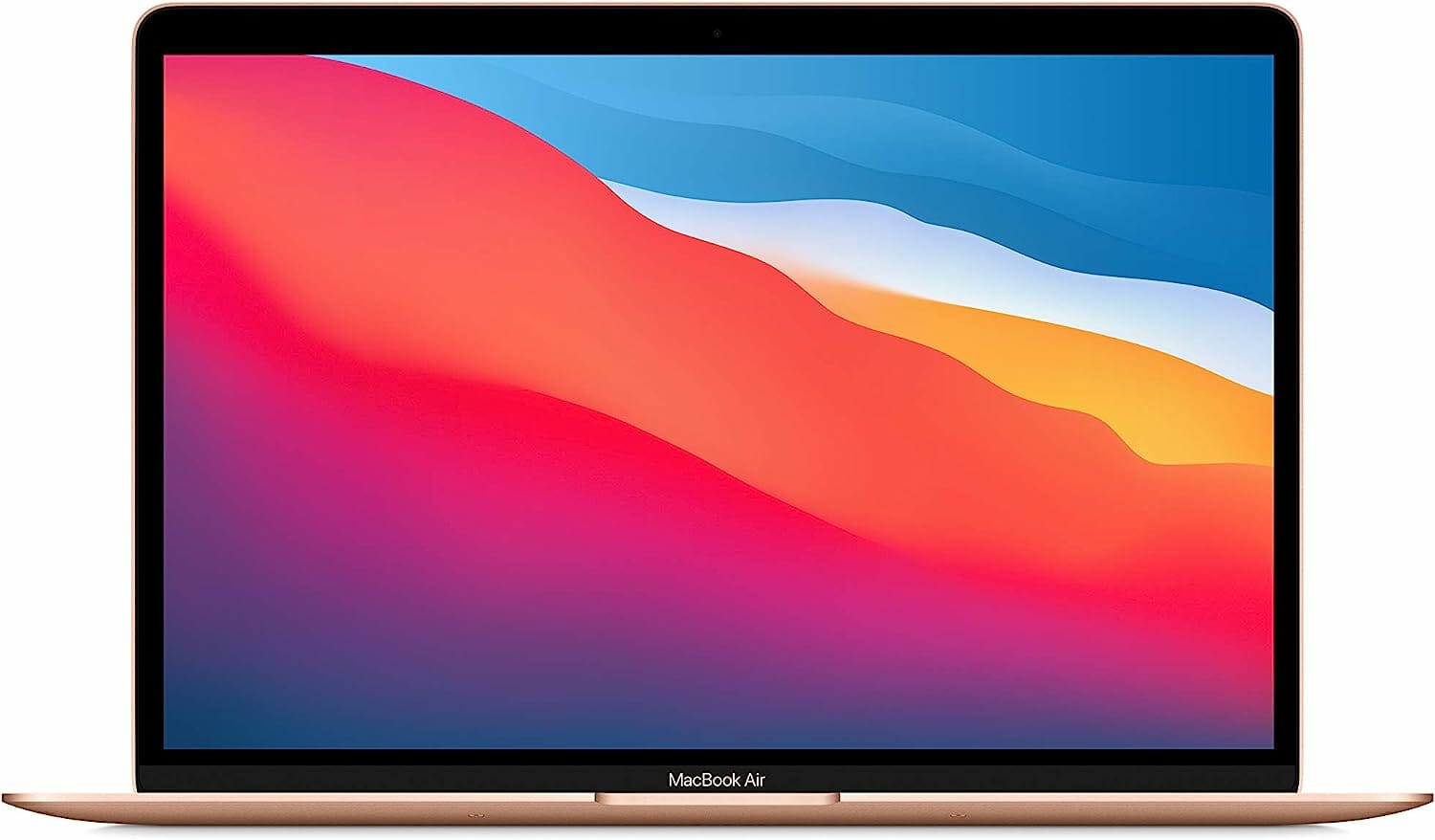
Apple 2023 MacBook Air M2
- Powerful M2 chip performance
- Impressive 15.3-inch Liquid Retina display
- Up to 18 hours of battery life
- Fanless, silent operation
- Lightweight and slim design
From ultra-portable models for the nomadic worker to powerhouse machines for intensive tasks, the perfect laptop can transform your workspace into a haven of efficiency and innovation. With countless options available, choosing the right one can feel overwhelming.
That’s why we’ve narrowed down the top contenders to help you find a laptop that suits your needs, budget, and style. Dive in to discover how the best laptops can elevate your home office experience and support you in achieving your professional goals.
Short Buying Guide
1. Purpose and Usage:
- Casual Work: If your tasks mainly involve word processing, emails, and video calls, a mid-range laptop with an Intel Core i5 or AMD Ryzen 5 processor, 8GB RAM, and 256GB SSD should suffice.
- Heavy Tasks: For graphic design, video editing, or running virtual machines, look for a laptop with an Intel Core i7 or AMD Ryzen 7 processor, 16GB RAM, and 512GB SSD or more.
2. Portability and Design:
- Lightweight and Portable: For those who frequently move between rooms or need to work from various locations, opt for a lightweight laptop with a slim profile, preferably under 4 pounds.
- Ergonomic Design: If your home office setup is stationary, a larger screen (15 inches or more) and a comfortable keyboard will enhance your working experience.
3. Display Quality:
- Resolution: A Full HD (1920×1080) display is ideal for most users. For detailed graphic work or video editing, consider a 4K display.
- Panel Type: IPS panels offer better color accuracy and viewing angles, which are beneficial for tasks requiring precise visuals.
4. Battery Life:
- Look for a laptop with at least 8 hours of battery life to ensure uninterrupted work sessions, especially if you prefer to work without being tethered to a power outlet.
5. Connectivity and Ports:
- Ensure the laptop has a good range of ports, including USB-A, USB-C, HDMI, and an SD card reader, to connect various peripherals and external devices.
6. Budget:
- Entry-Level: $500-$800 for basic needs.
- Mid-Range: $800-$1,200 for better performance and features.
- High-End: $1,200 and up for top-of-the-line specs and premium build quality.
By keeping these factors in mind, you can find a laptop that not only meets your technical requirements but also complements your home office environment perfectly.
- Short Buying Guide
- Here are our recommended Top 9 Best Laptops for Home Office which you can purchase today
- Dell XPS 15 9520
- Apple 2023 MacBook Pro Laptop M3
- Apple 2023 MacBook Air M2
- ASUS 2023 Newest Zenbook 14X
- Huawei MateBook X Pro
- Dell XPS 13 9350
- Dell Inspiron 5635
- Microsoft Surface Book 2
- Lenovo 2023 Newest Ideapad 3i
- Conclusion
Here are our recommended Top 9 Best Laptops for Home Office which you can purchase today
| Award | Design | Laptops | Retailer |
|---|---|---|---|
| Best Premium Laptop for Home Office | Best Pick | View on Amazon | |
| Best High-End Laptop for Home Office | Staff Pick | View on Amazon | |
| Best Value Laptop for Home Office | Budget Pick | View on Amazon | |
| Best Smooth Laptop for Home Office | 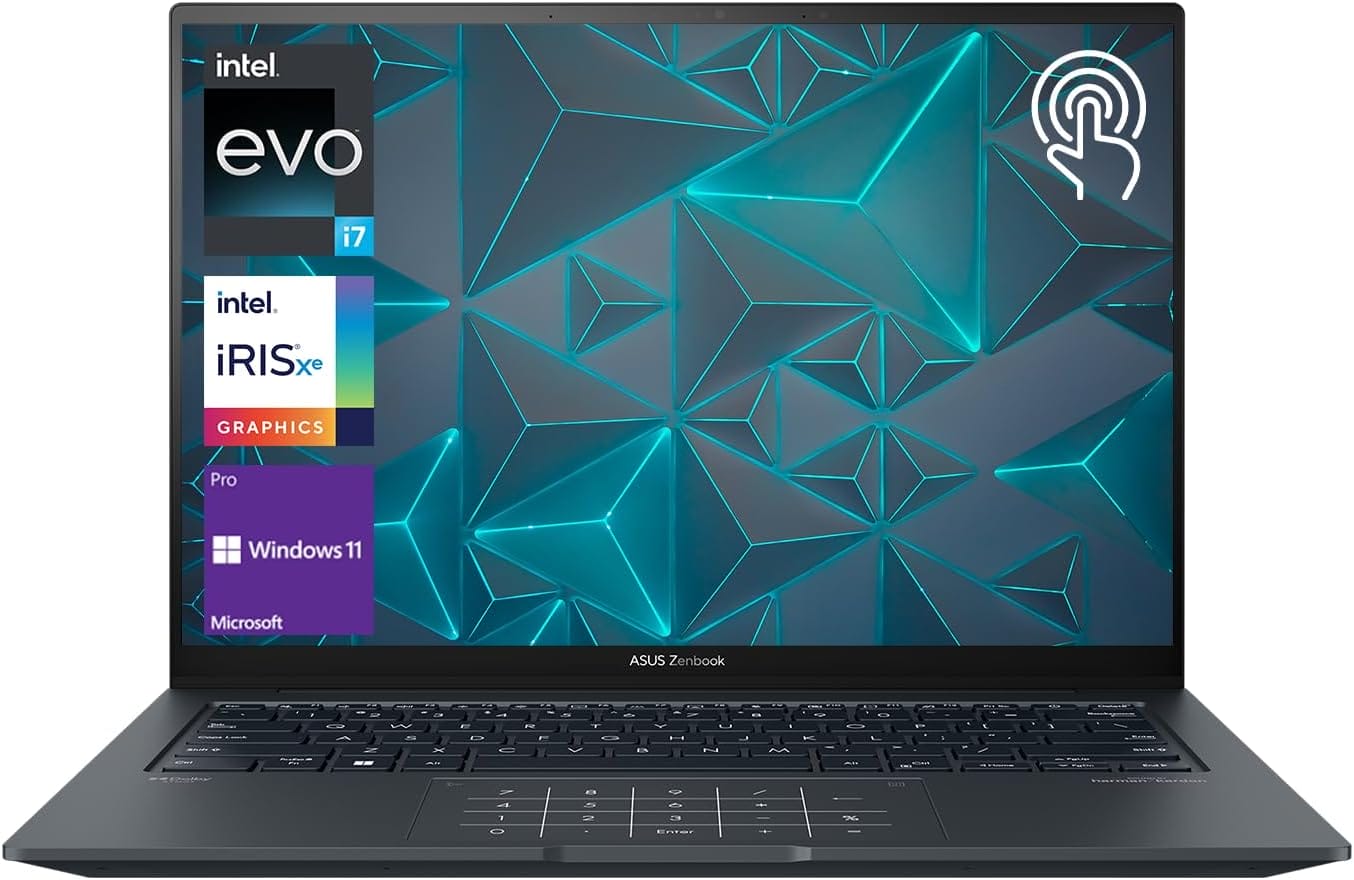 | View on Amazon | |
| Best Runner up Laptop for Home Office |  | View on Amazon | |
| Best All Rounder Laptop for Home Office |  | View on Amazon | |
| Best Budget Laptop for Home Office |  | View on Amazon | |
| Best Affordable Laptop for Home Office | 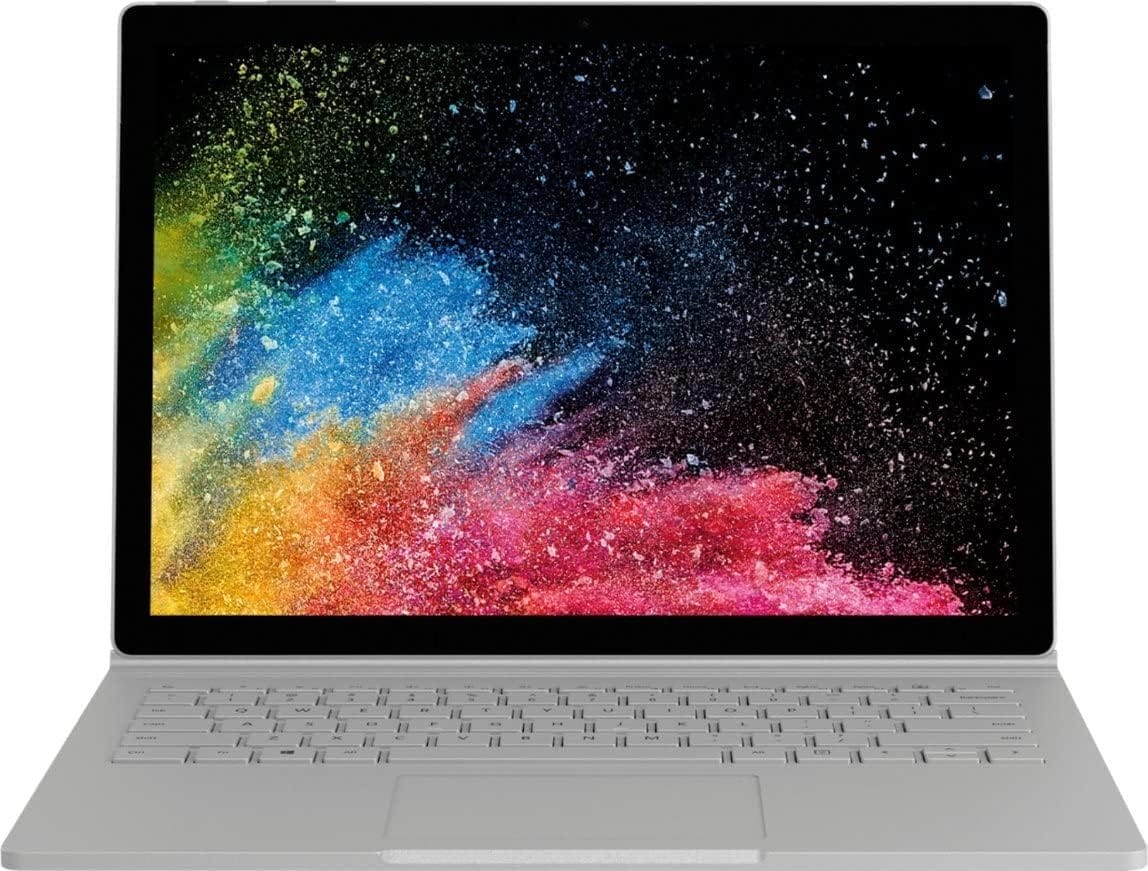 | View on Amazon | |
| Best Cheap Laptop for Home Office | 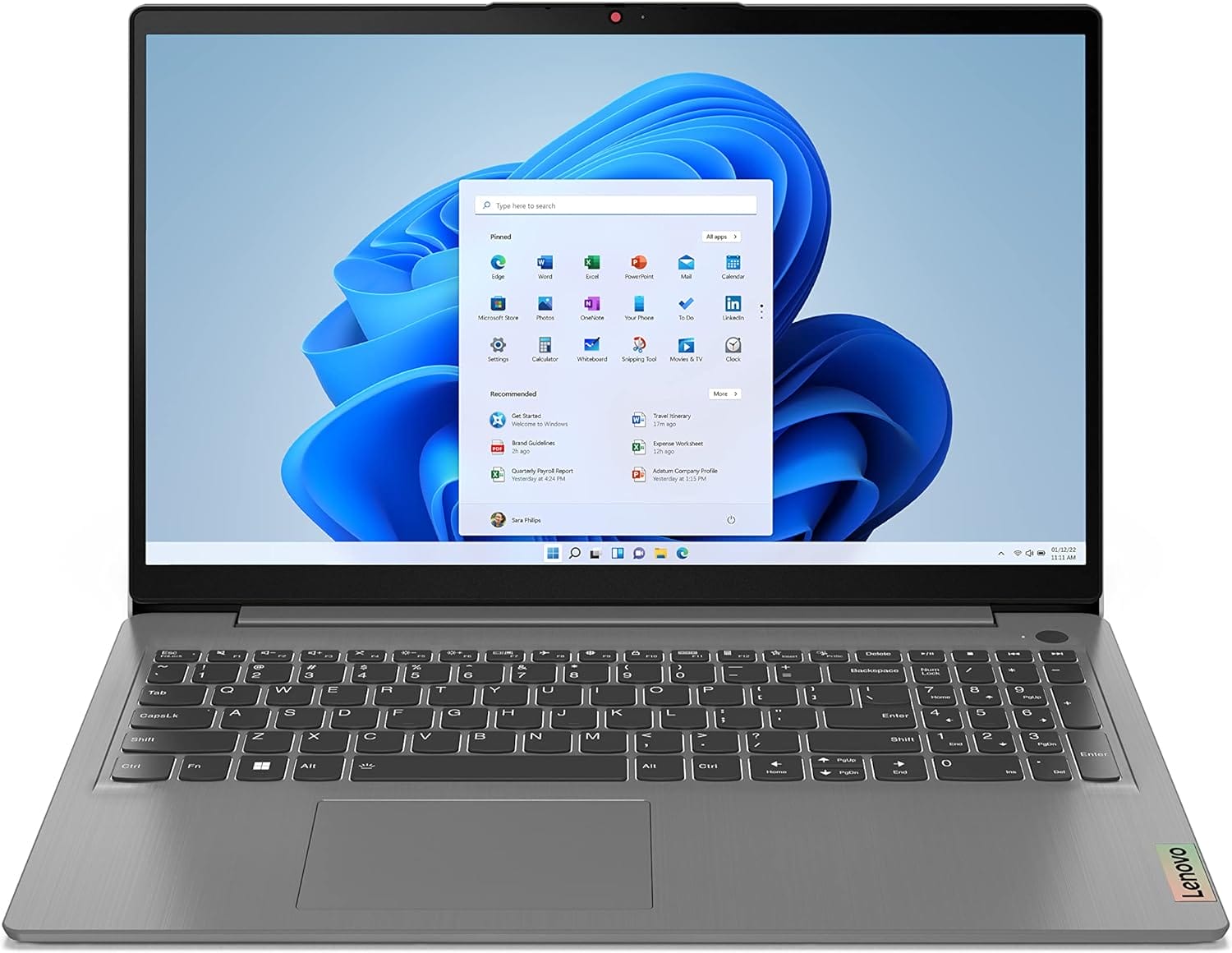 | View on Amazon |
Dell XPS 15 9520
Best Premium Laptop for Home Office
SPECIFICATIONS
Brand:Dell Screen Size:15.6 Inches Hard Disk Size:1 TB Special Feature:Backlit Keyboard Graphics Coprocessor:NVIDIA GeForce RTX 3050 Resolution:1080p Item Weight:10.7 Pounds Connectivity Technology:Bluetooth, Wi-Fi, USB, HDMI Has webcam capability?:Yes Graphics Ram Size:4 GB
REASONS TO BUY
✓Powerful performance with Intel Core i7-12700H
✓High-resolution, bright FHD+ display
✓Ample 32GB RAM and 1TB SSD
✓Versatile connectivity with Thunderbolt 4 and USB-C
✓Premium build quality and design
REASONS TO AVOID
✗Higher price point
✗Limited gaming capability with RTX 3050
If you’re in the market for a premium laptop that can handle both your demanding home office tasks and occasional gaming sessions, the Dell XPS 15 9520 is a top contender that seamlessly blends power with elegance. As the latest model in Dell’s flagship XPS series, it’s engineered to deliver exceptional performance while maintaining a sleek, stylish design.
Performance:
At the heart of the Dell XPS 15 9520 is the powerful 12th Generation Intel Core i7-12700H processor, featuring 24MB cache and a remarkable boost clock of up to 4.7 GHz. With 14 cores under the hood, this laptop can effortlessly handle multitasking, heavy-duty applications, and even intensive workflows such as video editing or 3D rendering. Complementing this powerhouse is 32GB of DDR5 RAM running at 4800MHz, ensuring smooth performance and quick access to data, which is especially beneficial for users who frequently work with large files or run multiple applications simultaneously.
The 1TB PCIe SSD provides ample storage space and lightning-fast read and write speeds, so booting up, launching applications, and accessing files is virtually instantaneous. This setup not only enhances productivity but also ensures that the laptop remains responsive even under heavy workloads.
Display and Graphics:
The 15.6-inch FHD+ display with a resolution of 1920×1200 pixels is both vibrant and clear. The 500-nit brightness and anti-glare coating make it easy to work in various lighting conditions, whether you’re in a brightly lit room or near a window. The InfinityEdge design maximizes the screen real estate, giving you more space to view documents, spreadsheets, and creative projects without the distraction of bulky bezels.
The NVIDIA GeForce RTX 3050 with 4GB of GDDR6 memory offers solid graphics performance for light gaming and content creation. While it’s not a high-end gaming GPU, it handles most modern titles at moderate settings and supports GPU-accelerated tasks in creative software, making it a versatile option for users with varied needs.
Connectivity and Build:
The XPS 15 9520 is well-equipped with modern connectivity options. The inclusion of Intel Killer Wi-Fi 6 ensures fast and reliable internet speeds, essential for smooth video conferencing and file transfers. The array of ports includes two Thunderbolt 4 (USB Type-C) ports with DisplayPort and Power Delivery, a USB 3.2 Gen 2 Type-C port, and a 3.5mm headphone/microphone combo jack, providing flexibility for connecting various peripherals and external displays.
The laptop’s build quality is exemplary. The platinum silver exterior and black interior lend a sophisticated look, while the sturdy construction ensures durability. The 86 Wh battery, paired with Dell’s 130W USB-C adapter, provides robust power management to keep you productive throughout the day.
Overall:
The Dell XPS 15 9520 is a premium choice for those seeking a high-performance laptop that excels in both professional and recreational tasks. Its robust specifications, stunning display, and sleek design make it a standout option for a home office setup. While it comes at a higher price point, the investment is justified by its top-tier performance and feature set, making it a worthy companion for anyone looking to elevate their work and play experience.
Apple 2023 MacBook Pro Laptop M3
Best High-End Laptop for Home Office
SPECIFICATIONS
Brand:Apple Model Name:MacBook Pro Screen Size:14.2 Inches Color:Space Gray Hard Disk Size:512 GB CPU Model:Apple M3 Ram Memory Installed Size:8 GB Operating System:Mac OS Graphics Card Description:Integrated Graphics Coprocessor:Apple Integrated Graphics
REASONS TO BUY
✓Exceptional performance with M3 chip
✓Stunning Liquid Retina XDR display
✓Up to 22 hours of battery life
✓Advanced camera and audio
✓Versatile connectivity options
REASONS TO AVOID
✗Premium price
✗Limited to one external display
The Apple 2023 MacBook Pro with the new M3 chip sets a new benchmark for high-end laptops designed for professionals and power users. Combining cutting-edge technology with Apple’s hallmark design aesthetics, this model is an ideal choice for a home office where performance and efficiency are paramount.
Performance and Power:
At the heart of the MacBook Pro is Apple’s M3 chip, featuring an 8-core CPU and a 10-core GPU. This configuration delivers remarkable processing power and graphics performance, making it capable of handling demanding tasks such as editing 4K videos or working with large datasets. Whether you’re juggling multiple applications, running complex simulations, or engaging in creative projects, the M3 chip ensures smooth and responsive performance. Apple’s emphasis on efficiency with the M3 chip means you can expect consistent performance whether the laptop is plugged in or running on battery.
Display and Visuals:
The 14.2-inch Liquid Retina XDR display is nothing short of spectacular. With Extreme Dynamic Range and up to 1000 nits of sustained brightness for HDR content, this screen delivers vibrant colors and sharp details, ideal for photo and video editing. For everyday tasks, the 600 nits of brightness for SDR content ensures clarity and readability. The pro reference modes enhance color accuracy, making it a valuable tool for professionals who require precise visual details. The rounded corners of the display contribute to a modern look while the overall screen real estate provides ample space for multitasking.
Battery Life and Efficiency:
One of the standout features of the MacBook Pro is its impressive battery life, boasting up to 22 hours of use. This remarkable endurance is a testament to the efficiency of Apple’s silicon, allowing you to work uninterrupted throughout the day. Whether you’re traveling or working from a remote location, the long battery life ensures that you stay productive without constantly searching for an outlet.
Camera, Audio, and Connectivity:
For video calls and virtual meetings, the 1080p FaceTime HD camera and studio-quality three-mic array offer excellent image and sound quality, ensuring you look and sound professional. The six-speaker sound system with Spatial Audio enhances the multimedia experience, providing immersive audio for both work and entertainment.
Connectivity options are robust, with MagSafe charging, two Thunderbolt / USB 4 ports, an SDXC card slot, an HDMI port, and a headphone jack. These features provide versatility for connecting various peripherals and external devices. The inclusion of Wi-Fi 6E and Bluetooth 5.3 ensures fast and reliable wireless connections, further enhancing the laptop’s overall functionality.
Compatibility and Software:
The MacBook Pro is fully compatible with a wide range of professional applications, including Adobe Creative Cloud, Apple Xcode, and Microsoft 365. It also supports many iPhone and iPad apps, allowing for a seamless workflow across different Apple devices. The latest macOS update introduces new ways to enhance productivity, personalize your workspace, and elevate your overall computing experience.
Overall:
The Apple 2023 MacBook Pro with M3 chip is a formidable choice for anyone seeking a high-end laptop for a home office. Its powerful performance, stunning display, long battery life, and advanced connectivity options make it a standout in its class. While it comes with a premium price tag, the combination of cutting-edge technology and exceptional build quality justifies the investment, making it a worthy addition to any professional’s toolkit.
Apple 2023 MacBook Air M2
Best Value Laptop for Home Office
SPECIFICATIONS
Brand:Apple Model Name:MacBook Air Screen Size:15.3 Inches Color:Midnight Hard Disk Size:256 GB CPU Model:Unknown Ram Memory Installed Size:8 GB Operating System:Mac OS Special Feature:Apple M2 Chip, Liquid Retina display with True Tone Graphics Card Description:Integrated
REASONS TO BUY
✓Powerful M2 chip performance
✓Impressive 15.3-inch Liquid Retina display
✓Up to 18 hours of battery life
✓Fanless, silent operation
✓Lightweight and slim design
REASONS TO AVOID
✗Limited to one external display
✗No dedicated graphics for intensive tasks
The Apple 2023 MacBook Air M2 presents a compelling value proposition for those seeking a sleek, powerful, and highly portable laptop for a home office. Combining Apple’s latest M2 chip with an impressively thin and lightweight design, this model is crafted to deliver performance and efficiency without sacrificing style.
Performance and Power:
The MacBook Air M2 is powered by Apple’s new M2 chip, featuring an 8-core CPU and a 10-core GPU. This combination offers substantial performance improvements over its predecessors, making it capable of handling a range of tasks from everyday office work to more intensive applications such as photo editing and multitasking with large spreadsheets. With up to 24GB of unified memory, the MacBook Air M2 can efficiently manage multiple applications and large files, ensuring smooth and responsive performance even under pressure.
Display and Design:
The 15.3-inch Liquid Retina display is a standout feature of this MacBook Air. The high resolution, combined with 500 nits of brightness and P3 wide color gamut, delivers vibrant, crisp visuals that are ideal for both work and play. The display supports one billion colors, making it particularly beneficial for tasks that require accurate color representation, such as graphic design and video editing. The rounded corners of the screen contribute to a modern aesthetic, while the overall display provides ample real estate for a comfortable working experience.
True to its name, the MacBook Air is impressively thin and light, housed in a durable 100 percent recycled aluminum enclosure. Despite its slim profile, the laptop does not compromise on strength or style, making it an excellent choice for those who need a portable device that looks as good as it performs.
Battery Life and Efficiency:
With up to 18 hours of battery life, the MacBook Air M2 is designed to keep you productive throughout the day. The power-efficient M2 chip ensures that you get exceptional performance without draining the battery excessively, whether you’re working from home or on the go. This extended battery life reduces the need for frequent recharges, allowing you to focus on your tasks without interruption.
Quiet Operation and Audio:
One of the MacBook Air’s notable features is its fanless design, which allows it to run completely silently. This is particularly beneficial in a home office setting where a quiet environment is essential for concentration. Additionally, the laptop features a 1080p FaceTime HD camera and a three-microphone array, ensuring clear video and audio quality for virtual meetings. The six-speaker sound system with Spatial Audio provides an immersive audio experience for video content and music.
Compatibility and Software:
The MacBook Air M2 runs on macOS and is fully compatible with a range of professional applications, including Microsoft Excel and PowerPoint, Adobe Creative Cloud, and Google Workspace. The optimization for Apple silicon ensures that these applications run smoothly and efficiently. Regular free software updates from Apple keep the system secure and up-to-date, enhancing the overall user experience.
Overall:
The Apple 2023 MacBook Air M2 is an excellent choice for those seeking a high-value laptop for home office use. Its combination of powerful performance, a stunning display, long battery life, and a sleek, lightweight design makes it a standout option in the ultraportable laptop category. While it may not offer the same level of raw power as higher-end models, it provides a balanced mix of performance and portability that is well-suited for most professional and personal tasks.
ASUS 2023 Newest Zenbook 14X
Best Smooth Laptop for Home Office
SPECIFICATIONS
Brand:ASUS Model Name:ASUS Laptop Screen Size:14.5 Inches Hard Disk Size:512 GB CPU Model:Core i7 Ram Memory Installed Size:16 GB Operating System:Windows 11 Home Graphics Card Description:Integrated Graphics Coprocessor:Intel Iris Xe Graphics CPU Speed:5 GHz
REASONS TO BUY
✓Powerful Intel Core i7-13700H processor
✓Stunning 14.5″ 2.8K OLED display
✓Innovative NumberPad feature
✓Lightweight and sleek design
✓Runs Windows 11 Home
REASONS TO AVOID
✗Integrated graphics may limit gaming
✗Limited for very high-end graphics tasks
The ASUS 2023 Zenbook 14X stands out as a top choice for those seeking a smooth and efficient laptop for a home office. Combining robust performance with a stunning display, this model is designed to cater to professionals who demand both style and substance in their computing experience.
Performance and Processing Power:
At the core of the Zenbook 14X is the Intel Core i7-13700H processor, a 13th-generation powerhouse that promises exceptional performance for a variety of tasks. With its high clock speeds and multiple cores, the i7-13700H excels in handling demanding applications such as content creation, data analysis, and multitasking. Whether you’re running complex spreadsheets, editing photos, or managing large projects, this processor provides the speed and efficiency needed to keep your workflow smooth and uninterrupted.
Display Quality:
One of the standout features of the Zenbook 14X is its 14.5-inch 2.8K OLED display. OLED technology is renowned for its superior color accuracy, deep blacks, and excellent contrast ratios, making this display ideal for tasks that require precise visual details. The 2.8K resolution offers a sharp and clear image, enhancing productivity and making it easier to view intricate details in design work or high-resolution media. The vibrant colors and impressive contrast improve the overall visual experience, making it not only functional but also enjoyable for both work and leisure.
Graphics and Visuals:
The laptop is equipped with Intel Iris Xe Graphics, which, while integrated rather than dedicated, provides adequate performance for everyday tasks and light gaming. This integrated graphics solution is well-suited for tasks like video conferencing, streaming, and handling basic graphic design work. However, for more demanding gaming or professional-grade graphics work, you might find dedicated GPUs to be more capable.
Unique Features and Functionality:
The Zenbook 14X includes ASUS’s innovative NumberPad feature, which turns the touchpad into a numeric keypad when needed. This dual-functionality is particularly useful for professionals who frequently work with numbers and spreadsheets, providing added convenience without sacrificing the touchpad’s primary functionality.
Operating System and Usability:
Running on Windows 11 Home, the Zenbook 14X benefits from the latest OS enhancements, including a refreshed Start menu, improved connectivity options, and new ways to interact with apps and content. Windows 11 offers a streamlined and intuitive interface, making it easier to navigate and customize your workspace.
Build and Design:
The Zenbook 14X combines a sleek, modern design with a durable build quality. Its compact and lightweight form factor makes it highly portable, ideal for users who need a powerful yet easily transportable laptop. The design does not compromise on performance or functionality, striking a balance between elegance and practicality.
Overall:
The ASUS 2023 Zenbook 14X is a compelling choice for those seeking a smooth and efficient laptop for home office use. Its powerful Intel Core i7-13700H processor, stunning 2.8K OLED display, and innovative features like the NumberPad make it a versatile and high-performing device. While the integrated graphics may not suit heavy gaming or advanced graphic tasks, the overall performance and design make it a strong contender for professionals who value both performance and aesthetics in their home office setup.
Huawei MateBook X Pro
Best Runner up Laptop for Home Office
SPECIFICATIONS
Brand:HUAWEI Model Name:Huawei Matebook X Screen Size:13.9 Inches Color:Space Gray Hard Disk Size:512 GB CPU Model:Core i7 8550U Ram Memory Installed Size:16 GB Operating System:Windows 10 Home Special Feature:Fingerprint reader Graphics Card Description:Dedicated
REASONS TO BUY
✓Stunning 13.9″ 3K FullView touchscreen
✓Powerful 8th Gen Intel Core i7
✓NVIDIA GeForce MX150 for enhanced graphics
✓Lightweight and slim design
✓2nd Gen Dolby Atmos audio
REASONS TO AVOID
✗Integrated graphics not suited for high-end gaming
✗Limited to 60Hz refresh rate
The Huawei MateBook X Pro stands out as a strong runner-up for the best laptop for a home office, offering a combination of sleek design, powerful performance, and an immersive display. This laptop caters to professionals and power users who need a high-quality machine for both productivity and entertainment.
Design and Display:
The MateBook X Pro features a 13.9-inch 3K FullView touchscreen display with a stunning resolution of 3000 x 2000 pixels. The high screen-to-body ratio of 91% ensures that the display nearly fills the entire front of the laptop, providing an almost edge-to-edge viewing experience. This makes it ideal for immersive work and media consumption. The display’s 1500:1 contrast ratio and 260 PPI deliver vivid, sharp images with excellent detail, making it a great choice for tasks that require precise visual accuracy, such as graphic design or video editing. The 60Hz refresh rate is smooth enough for most productivity tasks, though it might not be optimal for high-end gaming.
Weighing just 2.93 lbs and with a slim profile of only 0.57 inches, the MateBook X Pro is highly portable, making it an excellent option for professionals who are frequently on the go. Its lightweight and thin design do not compromise its build quality or performance, maintaining a balance between portability and durability.
Performance:
Under the hood, the MateBook X Pro is powered by an 8th Gen Intel Core i7-8550U processor, paired with 16 GB of RAM. This combination ensures smooth multitasking and efficient performance for a variety of tasks, from managing large spreadsheets to running complex applications. The inclusion of an NVIDIA GeForce MX150 graphics card boosts performance by up to 40% compared to its predecessor, making it suitable for light gaming and handling graphics-intensive applications.
Audio and Visual Experience:
The laptop’s audio experience is enhanced by 2nd Gen Dolby Atmos technology, providing immersive sound that complements the high-quality visuals. Whether you’re watching movies or participating in virtual meetings, the combination of the high-resolution display and advanced audio technology creates an engaging multimedia experience.
User Experience and Connectivity:
Huawei has included some thoughtful features that enhance usability. The one-touch power button not only powers on the laptop but also integrates with Windows Hello for quick and secure authentication, allowing users to access their desktop in less than 8 seconds. The MateBook X Pro also comes with the compact Mate Dock 2.0, which offers a range of connectivity options including USB-A, USB-C, HDMI, and VGA ports, making it easy to connect various peripherals and external displays.
Software and Extras:
Running on Windows 10 Home Signature Edition, the MateBook X Pro is free from bloatware, providing a cleaner and faster user experience. The laptop includes a 1-year subscription to Office 365 Personal, adding value for users who rely on Microsoft Office applications for their work.
Overall:
The Huawei MateBook X Pro is a formidable choice for a home office setup. Its impressive 3K display, powerful internals, and sleek design make it a standout option for professionals who need a high-performing, portable, and visually engaging laptop. While it may not offer the latest in graphics performance or the highest refresh rate, it delivers a well-rounded experience that balances performance, aesthetics, and functionality, making it a strong contender for those seeking a top-notch home office laptop.
Dell XPS 13 9350
Best All Rounder Laptop for Home Office
SPECIFICATIONS
Brand:Dell Model Name:Dell XPS Screen Size:13.3 Inches Hard Disk Size:256 GB Ram Memory Installed Size:8 GB Graphics Card Description:Integrated, Dedicated Graphics Coprocessor:Intel HD Graphics 5500 Hard Disk Description:SSD Resolution:1080p Item Weight:1.3 Kilograms
REASONS TO BUY
✓Sleek and portable design
✓Impressive InfinityEdge 13.3″ Full HD display
✓Reliable performance with i5-6200U
✓Fast SSD storage
✓Lightweight at 1.3 kg
REASONS TO AVOID
✗Limited to integrated graphics
✗Only 256GB of storage
The Dell XPS 13 9350 emerges as a strong all-rounder laptop for a home office setup, offering a blend of sleek design, reliable performance, and impressive display technology. While it may not boast the very latest specs, it remains a solid choice for professionals seeking a dependable and stylish machine for everyday tasks.
Design and Build Quality:
The Dell XPS 13 9350 is renowned for its compact and stylish design. With a 13.3-inch InfinityEdge display, it maximizes screen real estate within a minimalist and slim profile. The laptop’s aluminum chassis not only gives it a premium feel but also ensures durability and a high-quality look. Weighing just 1.3 kilograms, it’s highly portable, making it ideal for professionals who need a lightweight device for both home and on-the-go use.
Display:
The 13.3-inch Full HD (1080p) InfinityEdge display is one of the XPS 13’s standout features. The near-borderless design offers an immersive viewing experience with vibrant colors and sharp details. This display is well-suited for tasks like document editing, video conferencing, and casual media consumption, providing clear and crisp visuals.
Performance:
Under the hood, the XPS 13 9350 is powered by a 6th Gen Intel Core i5-6200U processor, which provides reliable performance for everyday tasks. With a base clock speed of 2.3GHz and the capability to boost up to 2.8GHz, the i5-6200U handles multitasking and standard productivity applications efficiently. Coupled with 8GB of RAM, this setup ensures smooth performance during typical home office tasks such as web browsing, word processing, and spreadsheet management.
The 256GB SSD provides quick boot times and fast data access, enhancing the overall responsiveness of the system. While the storage capacity may be on the lower side for users with extensive file storage needs, it is generally sufficient for typical home office work.
Graphics and Connectivity:
The laptop features integrated Intel HD Graphics 5500, which is suitable for basic graphic tasks and light multimedia use. It’s not designed for high-end gaming or intensive graphic work, but it performs well for everyday needs.
Connectivity options include Bluetooth and standard ports for peripherals, although the laptop’s connectivity is relatively basic compared to newer models. The inclusion of Windows 10 Professional ensures robust security and business features, adding value for professional use.
Overall:
The Dell XPS 13 9350 stands out as a versatile and reliable laptop for a home office environment. Its sleek design, impressive InfinityEdge display, and solid performance make it a great all-rounder for professionals who value a balance of style, portability, and functionality. While it may not feature the most cutting-edge specs or the latest in connectivity, it offers a dependable and aesthetically pleasing option for those seeking a capable and stylish laptop for everyday use.
Dell Inspiron 5635
Best Budget Laptop for Home Office
SPECIFICATIONS
Brand:Dell Model Name:Dell Inspiron 16 5635 Laptop Screen Size:16 Inches Color:Platinum Silver Hard Disk Size:512 GB CPU Model:Ryzen 5 Ram Memory Installed Size:8 GB Operating System:Windows 11 Home Special Feature:Fingerprint Reader, Backlit Keyboard, Anti Glare Coating, Memory Card Slot Graphics Card Description:Integrated
REASONS TO BUY
✓Large 16″ 16:10 display
✓Powerful AMD Ryzen 5 processor
✓Ample 512GB SSD storage
✓Clear audio with AI noise reduction
✓Comfortable viewing with blue light reduction
REASONS TO AVOID
✗Integrated graphics limited for gaming
✗Basic design and build quality
The Dell Inspiron 5635 positions itself as an excellent budget-friendly option for a home office setup, combining a range of practical features with solid performance. Its balance of affordability and functionality makes it a compelling choice for users who need a reliable machine without breaking the bank.
Design and Display:
The Dell Inspiron 5635 features a 16-inch display with a 16:10 aspect ratio, offering a bit more vertical screen real estate compared to the standard 16:9 displays. This additional height is particularly useful for productivity tasks, providing more space for documents, web pages, and spreadsheets. The Full HD+ resolution (1920 x 1200) delivers sharp and clear visuals, making it suitable for everyday work and multimedia consumption.
The laptop’s design is practical and straightforward, with a sleek Platinum Silver finish that gives it a modern look. Despite its larger screen size, the overall dimensions are similar to those of a typical 15-inch laptop, making it relatively portable.
Performance:
Powered by the AMD Ryzen 5-7530U processor, the Inspiron 5635 offers robust performance for a budget laptop. With 8GB of LPDDR4x RAM and a 512GB SSD, it provides ample memory and storage for multitasking and managing files. The Ryzen 5-7530U handles daily tasks such as web browsing, word processing, and light data management with ease. The 512GB SSD ensures quick boot times and fast access to files, enhancing the overall responsiveness of the laptop.
Graphics and Audio:
Equipped with AMD Radeon Graphics, the Inspiron 5635 handles basic graphics tasks and light multimedia use. While it’s not designed for heavy gaming or intensive graphic work, it performs adequately for everyday applications and streaming.
The laptop’s audio features are noteworthy for its price range. It includes up-firing speakers that direct sound towards the user, enhancing the listening experience. The integrated AI noise reduction and dual microphones contribute to clearer audio during video calls, which is further supported by the FHD resolution camera and manual privacy shutter, ensuring secure and high-quality video chats.
Comfort and Usability:
Dell’s ComfortView and ComfortView Plus technologies help reduce harmful blue light emissions, contributing to a more comfortable viewing experience during extended periods of use. This is particularly beneficial for users who spend long hours in front of their screens.
Support and Extras:
The Inspiron 5635 comes with a 1-year onsite service, providing support at your location if needed. This added convenience ensures that any hardware issues covered by the warranty can be addressed without the need to visit a service center. Additionally, the Dell Migrate tool simplifies the process of transferring important files from an old PC to the new one, making the transition smoother.
Overall:
The Dell Inspiron 5635 stands out as a versatile and budget-friendly option for a home office. Its combination of a larger 16-inch display, decent performance, and practical features provides excellent value for the price. While it may not offer the high-end specs or premium design of more expensive models, it delivers reliable functionality and a range of features that make it well-suited for everyday work and multimedia use.
Microsoft Surface Book 2
Best Affordable Laptop for Home Office
SPECIFICATIONS
Brand:Microsoft Model Name:JJH-00001 Screen Size:13.5 Inches Hard Disk Size:512 GB CPU Model:Core i7 Ram Memory Installed Size:16 GB Operating System:Windows 10 Graphics Card Description:Dedicated Graphics Coprocessor:NVIDIA GeForce GTX 1050 CPU Speed:1.9 GHz
REASONS TO BUY
✓Powerful Intel i7 processor
✓Ample 16 GB RAM and 512 GB SSD
✓Enhanced graphics with NVIDIA GTX 1050
✓Versatile four modes of use
✓Vibrant 13.5″ PixelSense touchscreen
REASONS TO AVOID
✗Expensive compared to other budget options
✗GTX 1050 may not handle high-end gaming
The Microsoft Surface Book 2 is a standout choice for an affordable home office laptop, offering a blend of performance, versatility, and a high-quality display. With its strong specs and innovative features, it presents a compelling option for users who need both power and flexibility at a reasonable price.
Performance and Power:
At the heart of the Surface Book 2 is the 8th generation Intel Quad Core i7 processor, which provides impressive performance for a range of tasks. Whether you’re working on complex spreadsheets, running multiple applications simultaneously, or engaging in content creation, the i7 processor delivers the power needed to handle these demands smoothly. Coupled with 16 GB of RAM, the laptop ensures efficient multitasking and responsiveness.
The 512 GB of storage is ample for most users, providing sufficient space for documents, applications, and media files. This SSD-based storage not only speeds up boot times and application loading but also enhances overall system performance.
Graphics and Display:
The Surface Book 2 is equipped with an NVIDIA GeForce GTX 1050 discrete GPU with 2GB GDDR5 graphics memory. This dedicated graphics card offers enhanced graphics performance, making it suitable for tasks that require more graphical power, such as photo and video editing, as well as light gaming. While it may not be the top choice for high-end gaming, it significantly improves graphical capabilities compared to integrated options.
The 13.5-inch PixelSense display is one of the highlights of this laptop. With its high resolution and vibrant color reproduction, it delivers stunning visuals and an excellent touch experience. The touchscreen is highly responsive, allowing for precise input and interaction with applications. The display’s quality makes it ideal for detailed work and media consumption.
Versatility and Design:
One of the Surface Book 2’s most notable features is its versatility. The laptop supports four modes of use: laptop, tablet, studio, and view. This flexibility is facilitated by its detachable screen, which can be used independently as a tablet. This adaptability is particularly useful for presentations, creative work, or casual media consumption.
The addition of a new USB-C port is a welcome upgrade, providing more modern connectivity options and enhancing the laptop’s versatility. The inclusion of this port makes it easier to connect to a range of peripherals and accessories, improving overall usability.
Battery Life and Usability:
The Surface Book 2 offers up to 17 hours of video playback, which translates to a full day of use for most tasks. This impressive battery life is ideal for users who need to work on the go or in locations where charging options are limited.
Running Windows 10 Pro, the laptop provides a robust operating system with professional features, including advanced security and management tools. This OS ensures compatibility with a wide range of applications and provides a smooth, user-friendly experience.
Overall:
The Microsoft Surface Book 2 is a powerful and versatile laptop that delivers excellent value for those seeking an affordable solution for a home office. Its combination of a high-performance processor, dedicated graphics, and vibrant display, along with its flexible design, makes it a strong contender in its price range. While it may not be the cheapest option available, its features and performance make it a worthy investment for users who need a reliable and adaptable laptop for both work and play.
Lenovo 2023 Newest Ideapad 3i
Best Cheap Laptop for Home Office
SPECIFICATIONS
Brand:Lenovo Model Name:Ideapad 3i Screen Size:15.6 Inches Hard Disk Size:256 GB CPU Model:Core I3 1115G4 Ram Memory Installed Size:12 GB Operating System:Windows 11 Special Feature:Anti-Glare Coating Graphics Card Description:Intel UHD Graphics Graphics Coprocessor:Intel UHD Graphics
REASONS TO BUY
✓Large 15.6″ Full HD touchscreen
✓12 GB RAM for smooth multitasking
✓Fast 256 GB SSD storage
✓Affordable price
✓Versatile port selection
REASONS TO AVOID
✗Integrated Intel UHD Graphics
✗Limited storage capacity
The Lenovo 2023 Newest Ideapad 3i stands out as an excellent choice for a budget-friendly home office laptop. With a combination of a capable processor, decent memory, and a large touchscreen display, it offers solid performance for everyday tasks at an attractive price point.
Design and Display:
The Ideapad 3i features a 15.6-inch Full HD (1920 x 1080) display with IPS technology. This setup ensures vibrant colors and wide viewing angles, enhancing your visual experience whether you’re working on documents or streaming videos. The display’s 300 nits brightness and anti-glare coating make it suitable for various lighting conditions, reducing strain on your eyes. With a narrow bezel design, the laptop maximizes screen space, providing a more immersive viewing experience.
Performance:
Powered by the 11th Generation Intel Core i3-1115G4 dual-core processor, the Ideapad 3i offers reliable performance for typical home office tasks. The processor, with a base clock speed of 3.00 GHz and the ability to boost up to 4.10 GHz, handles everyday applications such as web browsing, word processing, and spreadsheet management with ease. Coupled with 12 GB of DDR4-3200 MHz RAM, multitasking is smooth, allowing you to run several applications simultaneously without significant slowdowns.
The laptop’s 256 GB SSD provides quick boot times and fast data access, improving overall system responsiveness. While the storage might be limited for users with extensive media files or software, it’s generally adequate for most work and everyday use cases.
Graphics and Connectivity:
The Ideapad 3i comes with Intel UHD Graphics, which is suitable for basic graphic tasks and light media consumption. It handles standard office applications and streaming well but may struggle with more demanding graphics applications or high-end gaming.
In terms of connectivity, the laptop includes a range of useful ports: HDMI 1.4, USB-A 2.0, USB-A 3.2, USB-C 3.2, and a headset jack. This selection covers most peripheral needs and ensures compatibility with various devices. Additionally, Bluetooth and Wi-Fi connectivity provide reliable wireless options for connecting to other devices and networks.
Operating System and Usability:
Running Windows 11, the Ideapad 3i benefits from the latest operating system features and security updates. Windows 11 offers a modern, user-friendly interface that enhances productivity and provides access to a wide range of applications through the Microsoft Store.
Overall:
The Lenovo 2023 Newest Ideapad 3i delivers strong value for those seeking a budget-friendly laptop for home office use. Its combination of a large, high-quality display, decent processing power, and ample memory make it a well-rounded option for everyday tasks. While it may not be suited for high-end gaming or intensive graphics work, it excels in handling typical office applications and general use. For users looking for an affordable, reliable laptop that gets the job done without breaking the bank, the Ideapad 3i is a commendable choice.
Conclusion
The Dell XPS 15 9520 is a premium choice for those seeking a high-performance laptop that excels in both professional and recreational tasks. Its robust specifications, stunning display, and sleek design make it a standout option for a home office setup.

CEO
Hi, My name is Bilal Ali and I am an affiliate marketer and have been involved in this field for a number of years. I have a lot of experience and knowledge in this area, which I love to share with others. I am always looking for new ways to improve my skills and learn more about affiliate marketing. I am also very active on social media, and love to connect with others in the industry.