
Welcome to the world of visual perfection, where every hue, shade, and pixel matter. In the realm of photo editing, precision is paramount, and your monitor serves as the canvas upon which your artistry unfolds. Whether you’re a seasoned professional or an aspiring enthusiast, finding the best monitor for photo editing is crucial to manifesting your creative vision with utmost clarity and fidelity.
Imagine a monitor that faithfully reproduces the vivid colors of a sunset, the subtle gradients of a portrait, or the intricate details of a landscape. Picture yourself immersed in a world where every edit is rendered with unparalleled accuracy, where your creativity knows no bounds, and where your final masterpiece is a true reflection of your artistic prowess.
At A Glance:
Best Value Monitor for Photo Editing
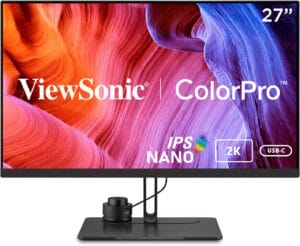
ViewSonic VP2776
- Stunning QHD resolution for lifelike visuals.
- Integrated ColorPro Wheel for precise color adjustments.
- Exceptional color accuracy with support for various standards.
- Nano IPS panel technology for deep and vibrant colors.
- Convenient connectivity options, including USB-C.
Best High End Monitor for Photo Editing
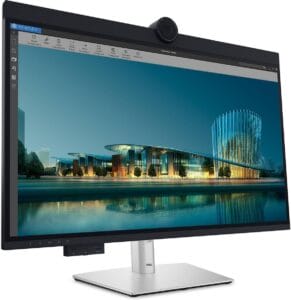
Dell UltraSharp U3224KB
- Expansive 31.5-inch viewable screen size
- High-resolution 6K screen mode
- USB Type-C connectivity for quick data transmission
- LED backlight technology for vibrant colors and efficiency
- Brightness of 450 nits for excellent visibility
- Fast 5 ms GTG response time for smooth motion
Best Budget Monitor for Photo Editing

Dell S2721QS 27
- Stunning 4K UHD resolution for crisp and detailed images.
- Three-sided ultrathin bezel design for immersive viewing.
- HDR content playback for lifelike visual experience.
- Elegant design with subtle textured pattern.
- Height-adjustable stand and ergonomic features for comfort.
- Seamless switching between devices with dual HDMI ports.
But with a plethora of options flooding the market, navigating the landscape of monitors can be daunting. Fear not, for we are here to guide you through this maze of choices and help you find the perfect monitor to elevate your photo editing experience to new heights.
Short Buying Guide:
Resolution and Size: Opt for a monitor with at least a 1440p resolution for crisp details, and consider sizes of 27 inches or larger for ample screen real estate.
Color Accuracy and Gamut: Look for monitors with high color accuracy, preferably covering 100% of sRGB and a significant portion of AdobeRGB or DCI-P3 color spaces for vibrant and true-to-life color reproduction.
Panel Type: Choose an IPS panel for wide viewing angles and consistent color accuracy across the screen, crucial for collaborative work and accurate photo editing.
Brightness and Contrast Ratio: Aim for monitors with high brightness levels and a decent contrast ratio to ensure your images pop with depth and clarity, even in varying lighting conditions.
Connectivity and Ergonomics: Consider the monitor’s connectivity options (HDMI, DisplayPort, USB-C) for seamless integration with your workflow, and prioritize ergonomic features like height adjustability and swivel for comfortable long editing sessions.
Additional Features: Keep an eye out for extras like hardware calibration support, built-in colorimeter, or ambient light sensors, which can further enhance your editing precision and workflow efficiency.
By prioritizing these key factors and considering your specific workflow requirements, you’ll be well-equipped to select the best monitor for photo editing that not only meets but exceeds your expectations, bringing your creative vision to life with unparalleled clarity and brilliance.
Here are our recommended Top 7 Best Monitor for Photo Editing which you can purchase today
| Award | Design | Retailer | |
|---|---|---|---|
| Best Value Monitor for Photo Editing | Best Pick | VIEW ON AMAZON | |
| Best High End Monitor for Photo Editing | Staff Pick | VIEW ON AMAZON | |
| Best Budget Monitor for Photo Editing | Budget Pick | VIEW ON AMAZON | |
| Best Runner Up Monitor for Photo Editing |  | VIEW ON AMAZON | |
| Best Smooth Monitor for Photo Editing |  | VIEW ON AMAZON | |
| Best Affordable Monitor for Photo Editing |  | VIEW ON AMAZON | |
| Best Cheap Monitor for Photo Editing |  | VIEW ON AMAZON |
ViewSonic VP2776
Best Value Monitor for Photo Editing
SPECIFICATIONS
Screen Size: 27 Inches | Display Resolution Maximum: 2560×1440 | Brand: ViewSonic | Special Feature: Height Adjustment, Anti Glare Screen, Hardware Calibration, Adaptive Sync, Pivot Adjustment, Blue Light Filter etc | Refresh Rate: 165 Hz
REASONS TO BUY
✓Stunning QHD resolution for lifelike visuals.
✓Integrated ColorPro Wheel for precise color adjustments.
✓Exceptional color accuracy with support for various standards.
✓Nano IPS panel technology for deep and vibrant colors.
✓Convenient connectivity options, including USB-C.
REASONS TO AVOID
✗May require additional calibration for specific color profiles.
The ViewSonic VP2776 stands as a testament to excellence in the realm of monitors, particularly tailored for the discerning needs of photo editing professionals and enthusiasts alike. Boasting a stunning QHD resolution of 2560×1440 pixels, this monitor offers a visually immersive experience that is both captivating and highly detailed. Whether you’re a graphic designer, photographer, or simply someone who values high-quality visuals, the VP2776 delivers lifelike colors and impeccable clarity, making it an ideal choice for various applications.
One of the standout features of the VP2776 is its integrated ColorPro Wheel, which provides users with the ability to fine-tune colors and adjust calibration with exquisite precision. This level of control ensures that your images are reproduced accurately, allowing you to achieve the desired visual aesthetic with ease. Additionally, the monitor offers exceptional color accuracy, with support for 100% sRGB, EBU, SMPTE-C, Rec. 709, and Delta E<2 standards. This ensures that the colors you see on screen are true to life, enabling you to create stunning visuals that meet professional standards.
Another highlight of the VP2776 is its Nano IPS panel technology, which delivers deep and vibrant on-screen colors with 95% DCI-P3 color coverage. Combined with VESA DisplayHDR 400 certification, this monitor offers optimal luminance, a powerful dynamic contrast ratio, and breathtaking image quality that enhances your viewing experience. Whether you’re editing photos, watching movies, or working on creative projects, the VP2776 delivers stunning visuals that are sure to impress.
In terms of connectivity, the VP2776 offers a convenient solution to cable clutter with its single 90W USB-C cable that can connect video, audio, data, and power. Additionally, the monitor features a USB hub that allows you to plug in peripherals such as USB drives and mice, further enhancing your productivity and workflow.
Conclusion
Overall, the ViewSonic VP2776 is a premium monitor that combines exceptional color accuracy, stunning visual quality, and versatile connectivity options to meet the demands of professionals and enthusiasts alike. Whether you’re editing photos, designing graphics, or simply enjoying multimedia content, the VP2776 delivers an unparalleled viewing experience that sets it apart as the best value monitor for photo editing.
Dell UltraSharp U3224KB
Best High End Monitor for Photo Editing
SPECIFICATIONS
Screen Size: 31.5 Inches | Display Resolution Maximum: 6144 x 3456 Pixels | Brand: Dell | Special Feature: Built-In Webcam, Height Adjustment, Swivel Adjustment, USB Hub, Tilt Adjustment, Built-In Speakers | Refresh Rate: 60 Hz
REASONS TO BUY
✓Expansive 31.5-inch viewable screen size
✓High-resolution 6K screen mode
✓USB Type-C connectivity for quick data transmission
✓LED backlight technology for vibrant colors and efficiency
✓Brightness of 450 nits for excellent visibility
✓Fast 5 ms GTG response time for smooth motion
REASONS TO AVOID
✗High price tag
✗May be too large for some workspaces
The Dell UltraSharp U3224KB is a premium monitor designed to meet the demanding needs of professional photo editors, graphic designers, and content creators. With its array of advanced features and impressive specifications, it offers unparalleled performance and reliability for those who require the highest level of image quality and color accuracy.
One of the standout features of the Dell UltraSharp U3224KB is its expansive 31.5-inch viewable screen size, which provides ample real estate for multitasking and immersive viewing experiences. Whether you’re editing high-resolution photos, working on detailed design projects, or watching movies, games, and photos, the U3224KB delivers striking clarity and detail with its 6K screen mode.
The monitor’s LED backlight technology ensures visual brilliance and maximum efficiency, allowing you to enjoy vibrant colors and deep blacks while minimizing power consumption. With a brightness of 450 nits, the U3224KB offers excellent visibility even in well-lit environments, ensuring that your work is always displayed with optimal clarity and contrast.
The inclusion of USB Type-C connectivity enables quick transmission of data at a higher rate, providing added convenience for users who need to connect multiple devices to their monitor. This feature allows for seamless integration with compatible laptops, tablets, and other devices, streamlining your workflow and enhancing productivity.
In terms of performance, the Dell UltraSharp U3224KB excels with its 5 ms GTG (Fast) response time, making it ideal for viewing fast-paced content such as action films, sports, and gaming. Whether you’re editing videos or playing the latest games, you can expect smooth motion and minimal motion blur for a more immersive experience.
Conclusion
While the Dell UltraSharp U3224KB is undoubtedly a high-end monitor with a price tag to match, its combination of premium features, exceptional image quality, and reliable performance make it well worth the investment for professional users who demand the best. Whether you’re a photographer, designer, or content creator, the U3224KB delivers the tools you need to bring your creative vision to life with precision and accuracy.
Dell S2721QS 27
Best Budget Monitor for Photo Editing
SPECIFICATIONS
Screen Size: 27 Inches | Display Resolution Maximum: 3840 x 2160 | Brand: Dell | Special Feature: Curved,High Dynamic Range,Swivel Adjustment,Height Adjustment,Pivot Adjustment,Tilt Adjustment | Refresh Rate: 60 Hz
REASONS TO BUY
✓Stunning 4K UHD resolution for crisp and detailed images.
✓Three-sided ultrathin bezel design for immersive viewing.
✓HDR content playback for lifelike visual experience.
✓Elegant design with subtle textured pattern.
✓Height-adjustable stand and ergonomic features for comfort.
✓Seamless switching between devices with dual HDMI ports.
REASONS TO AVOID
✗May lack advanced color calibration features for professional editing.
✗Some users may prefer a larger screen size for enhanced productivity.
The Dell S2721QS 27 is a standout choice for users seeking a budget-friendly monitor for photo editing. With its immersive display, elegant design, and seamless switching capabilities, it offers an exceptional viewing experience at an affordable price point.
One of the most striking features of this monitor is its stunning 4K UHD resolution, which delivers four times the clarity of Full HD. This high resolution, combined with a three-sided ultrathin bezel design, provides users with immersive viewing that brings images to life with incredible detail and vivid colors. Additionally, the monitor supports HDR content playback, enhancing the visual experience with lifelike contrast and brightness.
In terms of design, the Dell S2721QS 27 boasts an elegant aesthetic with a subtle textured pattern on the backside, adding a touch of sophistication to any workspace. The monitor’s sleek profile and slim bezels make it a stylish addition to any environment, whether at home or in the office.
Comfort is key during extended photo editing sessions, and the Dell S2721QS 27 excels in this area. It features a height-adjustable stand, as well as tilt, swivel, and pivot capabilities, allowing users to customize their viewing experience for optimal comfort and ergonomic support. Whether sitting or standing, users can easily adjust the monitor to suit their preferences and reduce strain on their neck and eyes.
Seamless switching between devices is another standout feature of this monitor. With built-in dual HDMI ports, users can keep their devices connected at all times and effortlessly switch between streaming content and console gaming. This versatility ensures that users can easily transition between different tasks without any hassle.
Conclusion
Overall, the Dell S2721QS 27 offers exceptional value for users in need of a budget-friendly monitor for photo editing. With its immersive display, elegant design, ergonomic features, and seamless switching capabilities, it provides an outstanding viewing experience without breaking the bank. Whether for professional use or casual photo editing, this monitor delivers impressive performance and reliability at an affordable price.
Dell UltraSharp U2723QE
Best Runner Up Monitor for Photo Editing
SPECIFICATIONS
Screen Size: 27 Inches | Display Resolution Maximum: 4K Pixels | Brand: Dell | Special Feature: Tilt Adjustment, Swivel Adjustment, Pivot Adjustment, Height Adjustment, Blue Light Filter | Refresh Rate: 60 Hz
REASONS TO BUY
✓4K UHD resolution for crisp detail.
✓High brightness for vibrant colors.
✓Versatile connectivity options.
✓Fast response time for smooth motion.
REASONS TO AVOID
✗Anti-glare coating may affect clarity.
✗Response time may not satisfy hardcore gamers.
The Dell UltraSharp U2723QE is a top contender in the realm of monitors for photo editing, offering a blend of impressive features and reliable performance. With its 16:9 widescreen resolution, this monitor is not only suitable for professional editing tasks but also enhances movie watching and gaming experiences. Let’s delve deeper into its key attributes.
One of the standout features of the U2723QE is its 4K UHD resolution, which provides an ample amount of desktop space with more than 8 million pixels. This high resolution ensures crisp and detailed content, making it ideal for scrutinizing intricate details in images. Moreover, the 400 Nit brightness contributes to vibrant and energetic colors, allowing for accurate color representation crucial for photo editing.
The monitor’s 5 ms GTG (Fast) response time ensures smooth rendering of fast-paced content, making it suitable for watching action films, sports, and gaming. This responsiveness minimizes motion blur and ghosting, preserving clarity even during dynamic scenes.
Connectivity options are essential for versatility, and the U2723QE doesn’t disappoint. With HDMI input, users can effortlessly connect to top-of-the-line PCs, Blu-ray players, and gaming consoles, ensuring compatibility with various devices and applications. Additionally, VESA mount compatibility provides flexibility in installation, allowing users to mount the display on a wall or with a stand according to their preferences and workspace requirements.
While the U2723QE excels in many aspects, it’s essential to consider some potential drawbacks. The monitor’s anti-glare coating and 3H Hard Coating may not provide the same level of clarity and visual fidelity as glossy screens, impacting the viewing experience, especially in well-lit environments. Furthermore, while the 5 ms response time is suitable for most casual gaming and multimedia tasks, hardcore gamers may prefer monitors with faster response times for competitive gaming.
In conclusion, the Dell UltraSharp U2723QE strikes an excellent balance between performance, features, and affordability, making it a worthy runner-up in the category of monitors for photo editing. Its high-resolution display, vibrant colors, and versatile connectivity options cater to the needs of both professionals and enthusiasts alike, ensuring a satisfying and immersive visual experience.
INNOCN 27″ Mini
Best Smooth Monitor for Photo Editing
SPECIFICATIONS
Screen Size: 27 Inches | Display Resolution Maximum: 3840 x 2160 Pixels | Brand: INNOCN | Special Feature: HDR1000, USB Type C, Mini LED Backlit, Local Dimming, Pivot Adjustment, Wall Mountable, Flicker-Free | Refresh Rate: 60 Hz
REASONS TO BUY
✓Stunning Mini LED Backlit HDR Display
✓Extensive Connectivity Options
✓Excellent Color Accuracy and Coverage
✓Versatile Ergonomic Design
✓VESA Mountable
REASONS TO AVOID
✗Limited Availability of 4K HDR Content
In the ever-evolving realm of photo editing and creative endeavors, the INNOCN 27″ Mini LED Backlit 4K HDR Monitor stands out as a beacon of excellence, delivering a visual experience that is as breathtaking as it is functional. Packed with cutting-edge technology and an array of features tailored to meet the needs of professionals and enthusiasts alike, this monitor sets a new standard for precision and performance.
At the heart of this monitor lies its Mini LED Backlit Technology, a revolutionary approach to display illumination that unlocks the full potential of HDR content. With a peak brightness of 1,000 cd/m2, this monitor effortlessly captures the nuances of light and shadow, ensuring that every detail of your images is brought to life with unparalleled clarity and vibrancy. Whether you’re editing photos, watching movies, or playing games, the rich contrast and deep blacks provided by this display create an immersive viewing experience like no other.
Complementing its impressive visual capabilities is the A+ IPS panel, boasting 99% DCI-P3 and 99% Adobe RGB color gamut coverage. This level of color accuracy is essential for professional creatives who demand nothing but the best from their monitors. With a factory color collaboration report and a ∆E (Delta E) value of less than 2, you can trust that the colors you see on screen are true to life, allowing you to make precise edits with confidence.
Connectivity is another area where the INNOCN 27″ Mini excels, offering a range of ports including USB-C (with up to 65W Power Delivery), DisplayPort 1.4, and dual HDMI 2.1 ports. This versatility ensures seamless compatibility with a wide range of devices, from desktop PCs to laptops, tablets, gaming consoles, and more.
In terms of ergonomics, this monitor leaves nothing to be desired. Its multi-angle adjustable stand allows for height, swivel, tilt, and pivot adjustments, catering to the diverse needs of users in various settings. Additionally, the monitor is VESA mountable (100x100mm), offering even greater flexibility in terms of placement and setup.
Included in the package are the 27M2U-D 4K monitor itself, an HDMI cable, power supply, instruction manual, and a color collaboration report. With these essentials in hand, you’ll be ready to dive into a world of creativity and productivity straight out of the box.
Conclusion
Overall, the INNOCN 27″ Mini LED Backlit 4K HDR Monitor is a powerhouse of performance, delivering unparalleled color accuracy, connectivity, and ergonomic design. Whether you’re working from home, tackling office duties, engaging in design or photo/video editing, or immersing yourself in gaming, this monitor is sure to elevate your experience to new heights. With INNOCN’s commitment to excellence and 24/7 online support, you can trust that you’re investing in a product that will enhance your creative journey for years to come.
ASUS ProArt Display 27
Best Affordable Monitor for Photo Editing
SPECIFICATIONS
Screen Size: 27 Inches | Display Resolution Maximum: 3840 x 2160 Pixels | Brand: ASUS | Special Feature: Energy Efficient, High Color accuracy, Tilt, Swivel, Pitvot, Hight adjustment, Eye Care, Built-In Speakers | Refresh Rate: 60 Hz
REASONS TO BUY
✓Stunning 4K HDR Display
✓Wide Color Gamut Coverage
✓Calman Verified Color Accuracy
✓Extensive Connectivity Options
✓Complimentary Adobe Creative Cloud Subscription
REASONS TO AVOID
✗Potential Backlight Bleeding Issues
When it comes to finding the perfect balance between performance, affordability, and reliability in a monitor for photo editing, the ASUS ProArt Display 27 emerges as a shining example of excellence. Designed with the needs of creative professionals in mind, this monitor combines a host of impressive features with a budget-friendly price tag, making it an attractive option for photographers, designers, and enthusiasts alike.
At the heart of the ASUS ProArt Display 27 is its 27-inch 4K LED backlight HDR display, which delivers breathtaking clarity and detail with its 3840 x 2160 resolution. The inclusion of an IPS panel ensures wide 178° viewing angles, allowing you to collaborate with colleagues or showcase your work to clients without compromising on color accuracy or image quality.
Speaking of color accuracy, this monitor truly shines with its wide color gamut coverage. With 99% DCI-P3 and 99% Adobe RGB coverage, you can trust that the colors you see on screen are true to life, allowing you to make precise edits with confidence. What’s more, the ASUS ProArt Display 27 is Calman Verified and factory pre-calibrated to Delta E < 2 color accuracy, ensuring consistent and accurate colors right out of the box.
Connectivity is another area where this monitor excels, offering an array of ports including DisplayPort over USB-C with 96-watt Power Delivery, DisplayPort, HDMI, and a built-in USB hub. This extensive connectivity options make it easy to connect to a variety of devices, from laptops and desktops to cameras and external storage devices, allowing for seamless integration into your workflow.
As an added bonus, purchasers of the ASUS ProArt Display 27 will receive a complimentary 3-month Adobe Creative Cloud subscription, providing access to a suite of professional-grade creative tools to further enhance your editing capabilities.
Conclusion
In conclusion, the ASUS ProArt Display 27 sets a new standard for affordable excellence in photo editing monitors. With its stunning display, exceptional color accuracy, extensive connectivity options, and complimentary Adobe Creative Cloud subscription, it offers unbeatable value for photographers, designers, and creative professionals seeking a high-quality monitor without breaking the bank. Whether you’re editing photos, designing graphics, or creating digital art, this monitor is sure to elevate your creative workflow and inspire your imagination.
HP 24mh FHD
Best Cheap Monitor for Photo Editing
SPECIFICATIONS
Screen Size: 23.8 Inches | Display Resolution Maximum: 1920 x 1080 Pixels | Brand: HP | Special Feature: Height Adjustment, Blue Light Filter, Tilt Adjustment, Built-In Speakers | Refresh Rate: 75 Hz
REASONS TO BUY
✓Affordable Price Point
✓Slim and Attractive Design
✓Wide Viewing Angles
✓Multiple Connectivity Options
✓Built-in Speakers
REASONS TO AVOID
✗Limited Resolution (FHD)
In the realm of photo editing, a high-quality monitor is essential for bringing your creative vision to life. While many monitors on the market boast premium features and hefty price tags, the HP 24mh FHD stands out as a beacon of affordability without compromising on visual excellence. Let’s delve into what makes this monitor a standout choice for budget-conscious photographers, designers, and enthusiasts.
At the core of the HP 24mh FHD is its FHD display with IPS technology, delivering brilliant visuals and unforgettable quality. With a maximum resolution of 1920 x 1080 at 75 Hz, you’ll experience image accuracy and wide-viewing spectrums akin to premium tablets and mobile devices. Whether you’re editing photos, watching videos, or browsing the web, the clarity and vibrancy of the display ensure an immersive viewing experience that captivates the senses.
One of the standout features of this monitor is its ultra-slim design, which maximizes desk space and adds a touch of elegance to any workspace. The micro-edge display further enhances the aesthetic appeal by minimizing bezels and providing a seamless viewing experience across multiple monitors, perfect for creating a panoramic setup that immerses you in your work.
Connectivity is made effortless with a broad range of ports, including HDMI, DisplayPort, and VGA ports. Say goodbye to dongles and adapters – the HP 24mh FHD lets you easily connect to your PC, gaming console, and peripherals for big-screen entertainment without any hassle.
In addition to its visual prowess, this monitor also boasts built-in speakers for immersive sound and entertainment. Whether you’re editing photos, streaming movies, or listening to music, the two built-in 2W speakers deliver clear audio that enhances your multimedia experience.
Furthermore, the HP 24mh FHD prioritizes eye comfort with its Low Blue Light mode, which reduces strain on your eyes by shifting colors to a warmer spectrum and making whites more natural. This feature is particularly beneficial during extended editing sessions, ensuring that you can work comfortably without sacrificing visual quality.
Conclusion
In conclusion, the HP 24mh FHD proves that affordability doesn’t mean compromising on quality. With its outstanding visuals, ultra-slim design, panoramic viewing experience, easy connectivity, built-in speakers, and eye-friendly features, this monitor is a standout choice for budget-conscious individuals seeking a reliable companion for photo editing and multimedia enjoyment. Whether you’re a professional photographer or a hobbyist enthusiast, this monitor delivers exceptional value.
Overall Article Conclusion
Overall, the ViewSonic VP2776 is a premium monitor that combines exceptional color accuracy, stunning visual quality, and versatile connectivity options to meet the demands of professionals and enthusiasts alike.

CEO
Hi, My name is Bilal Ali and I am an affiliate marketer and have been involved in this field for a number of years. I have a lot of experience and knowledge in this area, which I love to share with others. I am always looking for new ways to improve my skills and learn more about affiliate marketing. I am also very active on social media, and love to connect with others in the industry.



